
Five days. Free. all online!
PHDwin V2 is a full-featured, fully integrated economics and decline curve software package written by petroleum engineers for the oil and gas industry, offering a complete solution to manage, organize, and evaluate reserves and economics. For many years it served engineers, analysts, and evaluators across domestic and international assets, bringing forecasting, economics, and reporting together in a single environment. This page describes PHDwin V2 for reference. The current and fully supported release is PHDwin V3, which builds on everything below with a modern SQL platform, faster performance, and the latest reporting and forecasting tools. We recommend all users choose PHDwin V3.
PHDwin V2 is an earlier generation of the software and is no longer the actively developed release. New users, and existing users looking for current features and support, should move to PHDwin V3, the industry-leading economics and reserves software for the oil and gas industry. V3 carries forward the capabilities V2 was known for and adds a Microsoft SQL foundation, effectively unlimited database size, and genuine multi-user collaboration.
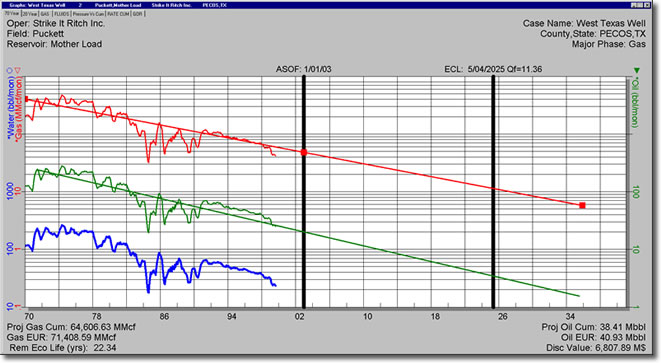
The graphics module was built for ease of use and quality of output, displaying economic results immediately on a graph after any modification to the forecast or economic variables. PHDwin V2 instantaneously displayed the results of any economic or forecast change on any graph, including cumulative discounted cash flow, estimated ultimate recovery, final economic limit date, cumulative production values, and key header data, all without re-running economics. For editing decline curves and calculating estimated ultimate recovery, the software offered three auto-fit options or direct curve parameter inputs, drag-and-drop projections or the ability to copy an analogous trend, multiple projections viewable on a single graph, reconciliation of decline estimates with in-place volumes, and rate-time or rate-cum projection. Graph layouts were highly customizable, with up to six different products and five forecasts per product on a single graph, along with color, line style, and annotation controls.
PHDwin V2 supported prospect work through normalized data for creating type curves and a Prospect Generator that combined basic well data with type curves to build a flexible drilling schedule. Dynamic dates made moving drilling schedules fast, and economic scenarios allowed for instant sensitivity analysis.
PHDwin V2 provided flexible economic modeling for almost any country, including US, Canadian, and international assets, with before and after tax calculations included. Cases could be projected in any volume convention, with economics reported in the volume and currency convention of choice. Its economics engine covered advanced modeling for prices, expenses, taxes, and royalties, along with links to common price, expense, tax, or royalty models. It supported sophisticated ownership modeling with multiple ownership decks and automated group reversions, the creation of custom product, revenue, expense, and tax streams, and investment grouping and tracking for capital budgeting.
PHDwin V2 allowed unlimited projects and easy data sharing. The .phz transfer file provided full transparency of all economic inputs and results, and was also useful for creating backups and maintaining corporate archives.
Group calculations affecting multiple cases, such as those associated with units and platforms, were handled through advanced automated group modeling that had previously required manual work. This covered field, unit, and platform level calculations, gross or net summary graphs, the allocation of revenues, expenses, taxes, or investments between cases, and group ownership reversions.
PHDwin V2 supported comprehensive US, Canadian, and international economics — before and after income tax — across more than forty countries and regions. Domestic and international fiscal regimes could sit in a single database, each case worked in its native units, currency, and model.
With flexible import/export functions, API access, and compatibility with industry standard tools, PHDwin makes it easy for partners to create tailored solutions. Whether integrating with Spotfire for advanced analytics or developing custom economic models, PHDwin adapts to their needs.
The volumetric calculator was integrated with the decline curves to calculate in-place volumes and automatically display recovery factor percentages, and BHP/Z could be projected to calculate in-place gas volumes linked to the gas decline curve.
Companies need to know how much they have already produced, how much is left to produce, and the total estimated economic recovery. PHDwin V2 provided over sixty built-in reports, including reports that comply with both SEC and NI 51-101 guidelines.
Sensitivity analysis was made manageable through an intuitive interface. Prices, expenses, and taxes could be grouped into scenarios to run sensitivity analysis quickly, incremental economics could be analyzed through automated case subtraction, and risk analysis could be performed through the Risk Tree, through case or volume multipliers, or through a combination of the two.
PHDwin V2 is a full-featured, fully integrated economics and decline curve software package written by petroleum engineers for the oil and gas industry. It provides a complete solution to manage, organize, and evaluate reserves and economics. It is an earlier generation of the software, and the current, fully supported release is PHDwin V3.
No. PHDwin V2 is no longer the actively developed release, and support is focused on PHDwin V3. Users seeking current features, updates, and dedicated engineering support should move to PHDwin V3.
Both share the same core capabilities in forecasting, economics, and reserves reporting. The key difference is the foundation: V3 is built on the Microsoft SQL platform, which delivers faster calculations, effectively unlimited database size, and genuine multi-user collaboration, along with modern reporting and forecasting tools and continued development.
Yes. Upgrading to PHDwin V3 lets you keep the workflow you know while gaining the performance, collaboration, and support that only the current release provides. Because active development and support are focused on V3, it is the version we recommend for every user.
PHDwin V2 offered integrated decline curves that displayed economic results immediately after any forecast change, three auto-fit options or direct curve parameter inputs, drag-and-drop projections, the ability to copy an analogous trend, multiple projections on a single graph, and rate-time or rate-cum projection. These capabilities continue in PHDwin V3.
Yes. PHDwin V2 supported comprehensive US, Canadian, and international economics for both before and after tax considerations, with economics modeled in more than forty countries and regions. Domestic and international fiscal regimes could be modeled within a single database, and each case could be worked in its native units, currency, and economic model.
PHDwin V2 provided over sixty default report formats, supported all conventional economic indicators, offered full Canadian NI 51-101 reporting, and included reports compliant with SEC guidelines. Custom MS Access queries and reports could be run from within the software, and full database access enabled integration with data visualization tools.
Support and active development are directed to PHDwin V3. The most reliable way to get current assistance is to move to V3, which includes access to TRC’s United States-based engineering support. You can contact the TRC team to discuss migrating from V2 to V3.
PHDwin V3 is designed to carry forward the work teams did in earlier versions. Because every migration differs in scope, we recommend starting a free trial or contacting the TRC team, who can confirm how your specific data and projects map into PHDwin V3.
You can start a 14-day free trial of PHDwin V3 with no credit card required, using a secure, Windows-compatible installer, and download it from the official download site. Explore the features, then contact the TRC team for a quotation matched to your team and deployment.